Wednesday, May 26, 2010

Protect The Microsoft Word 2007 Document with Password

When you have a secret document on Microsoft Word format, you might want nobody to read the document. Therefore, you need to protect the document. Here I show you how to protect your Microsoft Word 2007 document with password.

1.Open the Microsoft Word file that want to be protected. Then click Word 2007's logo on the left corner above. Choose prepare, then click “encrypt document”
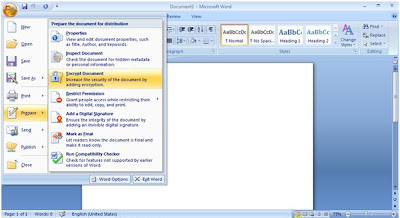
Password Protected on Microsoft Word 2007


2. Type your password, then OK.

Protect Your Microsoft Word Document with Password

3. Reenter password to confirm the password that is already inputted. Then click Ok
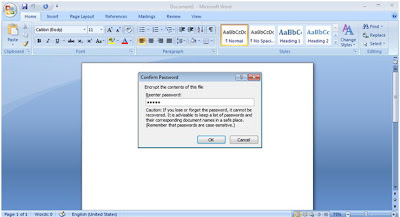
Microsoft Word Document Password Protected


4. Now your document already being protected and when anyone wants to open the document, the password is automatically asked to be inputted
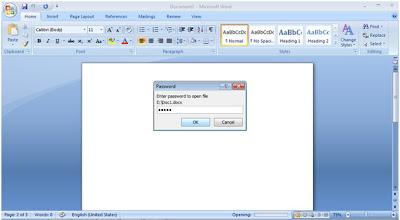
Protect The Microsoft Word Document With Password


Tuesday, May 18, 2010

Rimah Fakih Won Miss USA 2010

Rima Fakih is the Miss USA 2010. This 24 years old girl was raised in Dearborn Michigan. She competed to won the crown with 50 other contestant. Fakih born in Lebanon then her parents emigrated to the US when she was a baby. Before live in Michigan, Fakih’s family stayed in New York until 2003.
Rima Fakih is graduated from the University of Michigan-Dearborn majoring economics and business management. She is the first Miss Michigan to win the Miss USA title since Kenya Moore in 1993. In addition to winning scholarships and a wardrobe fit for a queen, Fakih will be given a luxury New York City apartment to live in while she's Miss USA.


Here are some pictures of Rima Fakih in Miss USA 2010

Rima Fakih Wearing Miss USA's Crown


Rima Fakih in Evening Gown


Rima Fakih in Bikini


Thursday, May 6, 2010

How to Have Fun With Google I'm Feeling Lucky Tool?

If you wanna have some fun with Google I'm Feeling Lucky Tool, here I show you some old tricks.

1. Type “google bsd” on the text box, then click “I’m Feeling Lucky” button. Now you can see Google’s devil on your computer.

2. Type “ewmew fudd” on the text box, then click “I’m Feeling Lucky” button. You will find Google with the Elmer Fudd text. Btw, do you know Elmer Fudd? He’s a cartoon character in the Looney Tunes that has aim to hunt bugs. Elmer speaks is very funny by replacing Rs with Ws, such as Watch the road, Rabbit = Watch the woad, Wabbit.

3. Type “xx-klingon” on the text box, then click “I’m Feeling Lucky” button. Now you have Google with xx-klingon language.


4. Type “googoth” on the Google search bar, then click “I’m Feeling Lucky” button then you will find the dark side of Google’s preface.

5. Type “google linux” on the text box, then click “I’m Feeling Lucky” button. Now you can see Linux’s penguin here.

6. Type “google easter egg” on the text box, then click “I’m Feeling Lucky” button. Now you can play with easter bunny to catch his eggs.

7. Type “bork,bork,bork” on the text box, then click “I’m Feeling Lucky” button. Now you have Google with bork,bork,bork language. It’s a joke language based on Swedish Chef character on The Muppet Show.

8. Type “elgoog” on the text box, then click “I’m Feeling Lucky” button. Now you have Google backwards on your computer.

9. Type “google l33t” on the text box, then click “I’m Feeling Lucky” button. Everything on the page has been change to a font with letters and numbers.

10. Type “google loco” on the text box, then click “I’m Feeling Lucky” button. Now you can see jiggle Google.

Twitter Delicious Facebook Digg Stumbleupon Favorites More

 
Powered by Blogger
TopOfBlogs